Challenge 2 – Set Up the SDD Development Tools
Back to Home
Challenge 2 – Set Up the SDD Development Tools
Why do we call it the “Wooden Sword Dojo”: The tools we recommend are all like “wooden swords” — they may not be the sharpest, but they are free, accessible, have few restrictions, and are durable enough for real work. They may not cut through iron, but they are more than solid enough for practice, and you do not have to worry about hurting yourself. Master the wooden sword first today; the legendary blades can wait until tomorrow.
Complete the following tasks:
1. Install the SDD Development Tools
Recommended:
| Region | IDE | Notes | URL |
|---|---|---|---|
| China mainland | TRAE CN | Recommended
Free and good enough. Aside from better LLMs (such as GLM5.1) requiring queue time, there are few restrictions. |
https://trae.cn/ |
| China mainland | CodeBuddy CN | Recommended
Free and good enough. It is a newer tool, supports GLM5.1, has fewer limitations, and seems to avoid long queues. [When TRAE CN has a long queue, CodeBuddy is a good backup option.] |
https://www.codebuddy.cn/ide/ |
| China mainland | Cursor | LLMs can only be used in Auto mode. The free version has token limits and runs out quickly. | https://www.cursor.com/downloads |
2. Get the Latest Code from the Git Repository
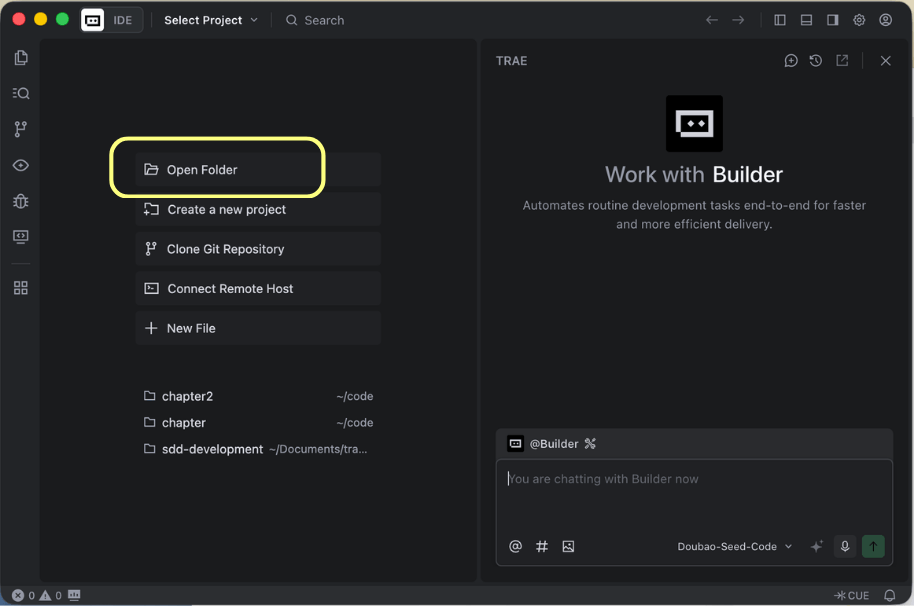
Step 1: Create a new folder called “playwhere”, then open TRAE CN and choose Open Folder
Step 2: Get the latest code
Method 1: Give the following instruction to AI:
从以下 git repository 获取最新代码:
https://gitee.com/woodsw0rd/playwhere.git
Method 2: Type this directly in the terminal:
git clone https://gitee.com/woodsw0rd/playwhere.git
3. Let AI Understand the Project Context and Install Dependencies
Give the following instruction to AI:
# 理解项目上下文
# 安装依赖项, 过程如遇到权限问题泽使用 sudo 命令
## 生成 sudo 命令
## 暂停进程, 等待我手动在 terminal 执行
## 我完成执行后继续进程
# 过程中如遇到其他问题, 则寻求我的帮助
## 暂停进程, 说明问题, 给出选项
## 等我提供方向后再继续
4. Run the “Where to Go” App
Method 1: Give the following instruction to AI:
run the app
Method 2: Type this directly in the terminal:
npm run dev
